Approval gates for LLM operators
See also
For a multi-round review loop on AgentOperator with a chat UI and REST API, see
Human-in-the-loop (HITL) review for agents.
Set require_approval=True and the task stops after the model answers. A person
reads the output in the Airflow UI and approves it, edits it, or rejects it, and only an
approved answer reaches the tasks downstream. To review each tool call an agent makes
rather than its final answer, see Approve an agent’s tool calls.
Approval gates need Airflow 3.1 or later. On an older Airflow version the operator
raises AirflowOptionalProviderFeatureException: require_approval=True needs Airflow 3.1+.
when it is constructed, so the Dag file fails to import, and with it every Dag
defined in that file. A dynamically mapped
task (.expand()) is only constructed when it runs, so there the same error
surfaces as a task failure, before the model is called.
A Dag with an approval gate
draft_release_note asks the model for a release note and waits for a reviewer.
publish runs only after the note is approved, and receives the approved text,
including any edit the reviewer made:
from datetime import timedelta

from airflow.providers.common.ai.operators.llm import LLMOperator
from airflow.sdk import dag, task

CHANGE = """
Webhook deliveries that fail with a 5xx response are now retried three times
with exponential backoff before the delivery is logged as failed.
Previously a single failed delivery dropped the event.
"""


@dag(schedule=None, tags=["example"])
def example_llm_approval():
    draft = LLMOperator(
        task_id="draft_release_note",
        prompt=f"Write a one-sentence release note for this change:\n{CHANGE}",
        llm_conn_id="pydanticai_default",
        system_prompt="You write release notes for the users of a developer platform. Be plain and specific.",
        require_approval=True,
        allow_modifications=True,
        approval_timeout=timedelta(hours=24),
    )

    @task
    def publish(note: str) -> None:
        print(f"Publishing release note: {note}")

    publish(draft.output)


example_llm_approval()
The Dag runs as-is once the pydanticai_default connection points at a model; see
Pydantic AI connection.
Where the review appears
Once the model has answered, draft_release_note writes its review request and pauses.
On Airflow 3.3 and later the task is in the awaiting_input state and holds no worker
slot. The last line of its log, inside the Post Execute group that the log view
shows collapsed, is:
Pausing task as AWAITING_INPUT.
On Airflow 3.1 and 3.2 the task is deferred instead, and the triggerer watches for the
answer, so a triggerer must be running.
Every review is listed under Browse > Required Actions. An open one carries the Approval Required badge; once answered, the row stays and the badge changes to Approval Received or Rejection Received:
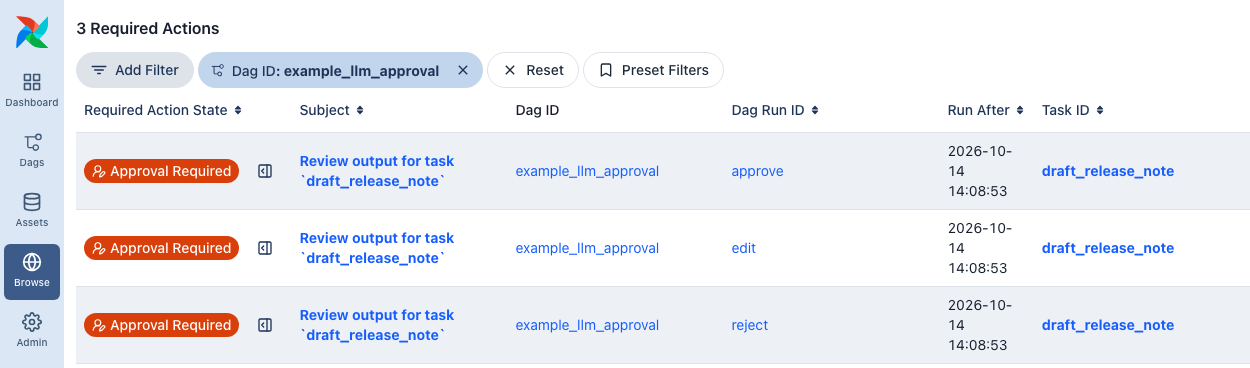
The subject links to the review. The task instance page opens it too: the task shows the Awaiting Input badge, and its Required Action (1) tab holds the form.
What the reviewer sees
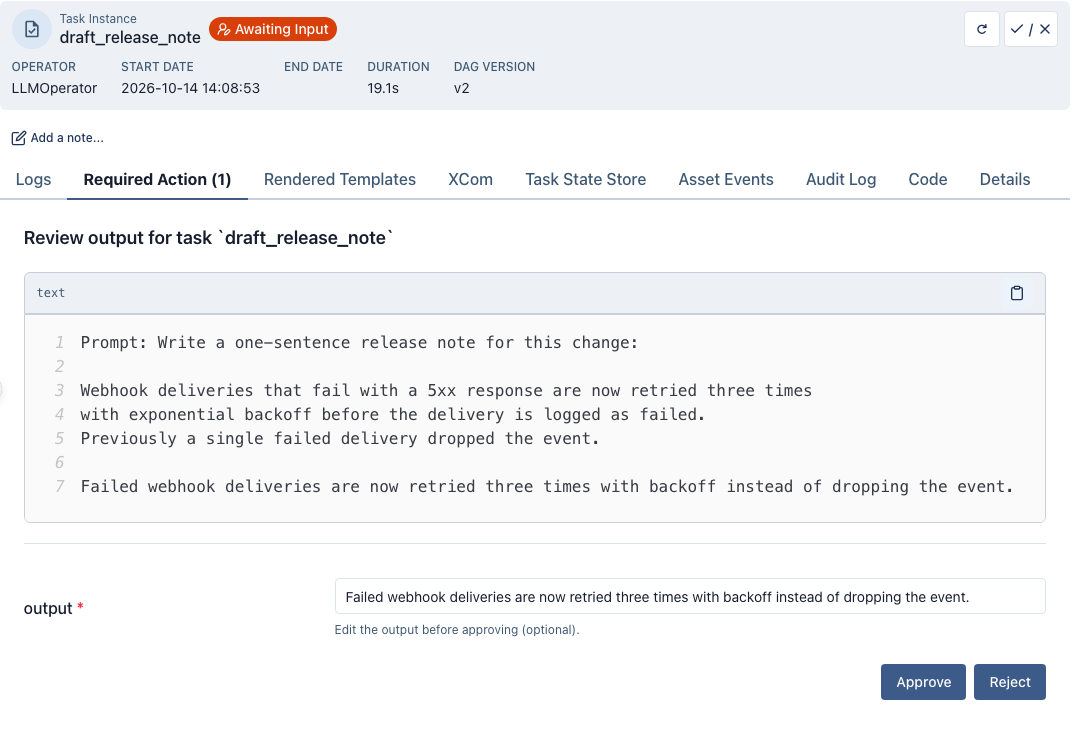
The form shows:
The subject,
Review output for task `draft_release_note`by default.The body: the rendered prompt, then the model’s output. The system prompt is not shown.
An
outputfield holding the model’s output, which the reviewer can change before approving. It is there because the Dag setsallow_modifications=True; without it the form has only the two buttons.Approve and Reject.
After the reviewer clicks a button, the form is disabled and shows
Response received at <time> from <user>, and the task resumes on a worker to apply
the answer.
What each answer does
Each row comes from a run of the Dag above, answered by the user admin, against a
stand-in model that always returns the same sentence; your model’s wording will differ.
The timeout rows set approval_timeout=timedelta(minutes=1) and the
on_approval_timeout value shown. An exception appears in the log under
Task failed with exception.
Answer |
Result |
|
|---|---|---|
Approve |
|
|
Edit the |
|
|
Reject |
|
|
No answer before |
|
|
No answer, with |
|
|
No answer, with |
|
|
After an approval, publish logs the text it received. For the plain approval:
Publishing release note: Failed webhook deliveries are now retried three times with backoff instead of dropping the event.
For the edited one:
Publishing release note: Webhook deliveries that fail with a 5xx response are now retried three times with exponential backoff.
The approved text is the task’s return_value XCom, which is what draft.output
passes to publish.
A rejection, or a timeout with "fail" or "reject", fails the task like any other
exception, so retries apply: with a retry left, the task goes to up_for_retry, and
the retry calls the model again and opens the review again, unanswered. On Airflow 3.4
and later the reopened review shows the new subject, body and output. On Airflow 3.1 to
3.3 it keeps the first attempt’s subject, body and output field, so the form shows the
earlier output: with allow_modifications=True, Approve returns that earlier text
unless the reviewer edits it; without it, Approve returns the regenerated output, which
the reviewer did not see. With retries=0, the default, a rejection is final.
With fail_on_reject=False, the default on LLMBranchOperator, a rejection, including
a timeout with "reject", succeeds the task instead and skips the direct downstream
tasks except teardowns, matching
ApprovalOperator. Set
ignore_downstream_trigger_rules=True to skip every downstream task rather than only the
direct ones. A timeout with "fail" still fails the task.
Editing structured output
On LLMOperator, LLMFileAnalysisOperator and LLMSchemaCompareOperator, the edited text is
converted back into output_type when the task resumes. Write it as JSON for the
type, such as 31 for an int, ["a", "b"] for a list[str] or an object for
a Pydantic model. If the edit field shows [object Object] for an object output,
replace its content with the JSON shown in the review body. Types that pydantic builds
from a string, such as a Literal, an Enum or str | None, also accept the bare text. If the text does not validate,
the task fails with
ReviewedOutputValidationError
naming the type and the (truncated) text received, rather than passing a value of the wrong
type downstream. Airflow retries it like any other failure, so with retries set the
next try runs the model again and the rejected edit is not carried over.
With output_type=str any edit is accepted as is, and so is an edit to a union with a str
member, such as Model | str, which keeps the text when it does not validate as the model.
An output function, a pydantic-ai
output marker such as ToolOutput, or a type pydantic has no schema for, is returned as
the text unchanged. An approval without an
edit whose output cannot be converted back (for example a custom serializer) also returns
the text with a warning, instead of failing the task. Computed fields are left out of the
text. A model with a serializer that cannot be reversed, or a required field excluded from
the dump, shows text that does not validate as shown, so write an edit in the form the model
accepts.
Timeouts
approval_timeout bounds the wait; the default None waits indefinitely. On Airflow
3.3 and later the scheduler resolves expired reviews, checking every
[scheduler] trigger_timeout_check_interval seconds (15 by default), so a review can
stay open that long past its deadline. On Airflow 3.1 and 3.2 the triggerer enforces the
deadline. on_approval_timeout="approve" returns the generated output when the
timeout expires. "reject" answers the review with a rejection, which fails the task
unless fail_on_reject=False. The chosen option is also pre-highlighted as the
default in the review form, so "reject" makes Reject the primary button.
This example approves the output if nobody answers within 24 hours, and logs each new review through a notifier:
class LogNotifier(BaseNotifier):
    template_fields = ("message",)

    def __init__(self, message: str) -> None:
        super().__init__()
        self.message = message

    def notify(self, context) -> None:
        self.log.info(self.message)


@dag(tags=["example"])
def example_llm_operator_approval():

    LLMOperator(
        task_id="summarize_with_approval",
        prompt="Summarize the quarterly financial report for stakeholders.",
        llm_conn_id="pydanticai_default",
        system_prompt="You are a financial analyst. Be concise and accurate.",
        require_approval=True,
        approval_timeout=timedelta(hours=24),
        on_approval_timeout="approve",
        allow_modifications=True,
        approval_notifiers=LogNotifier(message="{{ task.subject }}\n{{ task.body }}"),
    )
It runs as-is with the same pydanticai_default connection.
Notifying reviewers
Airflow sends no notification when a review opens. Pass
approval_notifiers to tell the reviewers about it through any Airflow
notifier (Slack, email, …), the way
HITLOperator does with
notifiers. The notifiers run once the review is open and can reference
the review {{ task.subject }} and {{ task.body }} in their templates,
as the example under Timeouts does: its notifier writes the subject and body to the
task log, just before Pausing task as AWAITING_INPUT. The @task.llm decorator
and the LLMOperator subclasses (LLMBranchOperator, LLMSQLQueryOperator,
LLMSchemaCompareOperator, LLMFileAnalysisOperator) accept the same
parameter. A notifier that raises is logged as
Approval notifier <notifier> failed; the review stays open and the task still
waits for the review. A Jinja TemplateError in a notifier’s template fails the
task. A retry re-runs the LLM and re-notifies with the regenerated output. What the
reopened review shows depends on the Airflow version, as described under
What each answer does.
The default body contains the rendered prompt and the output. Where either
is sensitive, template only {{ task.subject }} and a link to the review
into channels outside Airflow’s auth boundary.
Restricting who can review
By default any user allowed to edit the Dag’s Human-in-the-loop details can answer the
review; under the FAB auth manager that is the can edit on HITL Detail permission,
which the User role and every role above it have. Pass
approval_assigned_users=[{"id": "<auth-manager-user-id>", "name": "<user-name>"}]
to restrict it to named reviewers, the way
HITLOperator does with
assigned_users. id is the user id reported by the auth manager: with
the default SimpleAuthManager it is the username from
simple_auth_manager_users; under the FAB auth manager it is the numeric
user row id as a string, not the username. On Airflow 3.1.0 through 3.1.5 both
id and name must match what the auth manager reports, so a wrong
name blocks the assigned reviewer as well as everyone else; from 3.1.6 only
id is compared. On Airflow 3.4 and later a cleared or retried task replaces the
list along with the rest of the review. On Airflow 3.1 to 3.3 the list is stored when the
review is first created, so if you edit approval_assigned_users and clear the task,
the old list still applies.
Reviewing uncertain output
Note
Experimental: this can change or be removed in a minor release of this provider. See Stable and experimental features.
A decision model reports a confidence for every field of a structured output, in
provider_details on the model response. It is a
summary of how concentrated the model’s probability distribution was, not the
probability that the field is right. decision_policy=DecisionPolicy(min_confidence=0.7)
(import DecisionPolicy from airflow.providers.common.ai.operators.llm)
is the bar the least confident field has to clear for the operator to return
the output by itself. Only fields that reported a confidence are compared: a
field whose type reports none (a bounded float, where the probability is the
answer) is not gated, and the record’s confidence map shows which fields
were. Under the bar, the policy’s on_uncertain applies: "review"
(default) sends the output to human review through the same approval flow as
require_approval, with the same approval_timeout,
on_approval_timeout and notifier settings; "fail" fails the task with
LowConfidenceError (from airflow.providers.common.ai.exceptions), which
Airflow retries like any other failure unless a retry rule says otherwise. A
text model reports no confidence for any field, which counts as uncertain, so
switching the connection does not silently switch off a control you set.
require_approval=True keeps its meaning and always asks, and
on_uncertain="review" needs Airflow 3.1+ like it does. The policy is
honoured by LLMOperator and LLMBranchOperator; the SQL, schema-compare
and file-analysis operators run their own execute and reject a policy with a
bar at construction.
With or without a bar, the operator pushes a decision XCom carrying the
model name, the per-field confidence and probabilities (empty for a text
model), the bar that applied, why the output went to review if it did, who
decided, and the gate configuration in force.
A pending record is checkpointed with the paused task and finalized from that
copy on resume, not from the XCom. See LLMBranchOperator for the
record’s fields; there proposed and action name the branches, while
here they are null and the output itself is the return value.