Edge UI Plugin and REST API
The Edge provider uses a Plugin to
Extend the REST API endpoints for connecting workers to the Airflow cluster
Provide a web UI for managing the workers and monitoring their status and tasks (Note: Airflow 3.0 does not have support for UI plugins. The UI plugin is only available in Airflow 3.1 and newer.)
REST API endpoints
The Edge provider adds the following REST API endpoints to the Airflow API:
/edge_worker/v1/jobs: Endpoints to fetch jobs for workers and report state/edge_worker/v1/logs: Endpoint to push log chunks from workers to the Airflow cluster/edge_worker/v1/workers: Endpoints to register and manage workers, report heartbeat/edge_worker/v1/health: Check that the API endpoint is deployed and active
To see full documentation of the API endpoints open the Airflow web UI and navigate to
the sub-path /edge_worker/docs.
Web UI Plugin
Note
Airflow 3.0 does not support UI plugins. The UI plugin is only available in Airflow 3.1 and newer. Alternatively you can use the CLI commands as described in Worker Maintenance Management CLI.
The Edge provider adds a web UI plugin to the Airflow web UI. The plugin is made to be able to see job queue and Edge Worker status.
Pending and processes tasks can be checked in “Admin” - “Edge Worker Jobs” page.
Worker status can be checked via the web UI in the “Admin” - “Edge Worker” page.
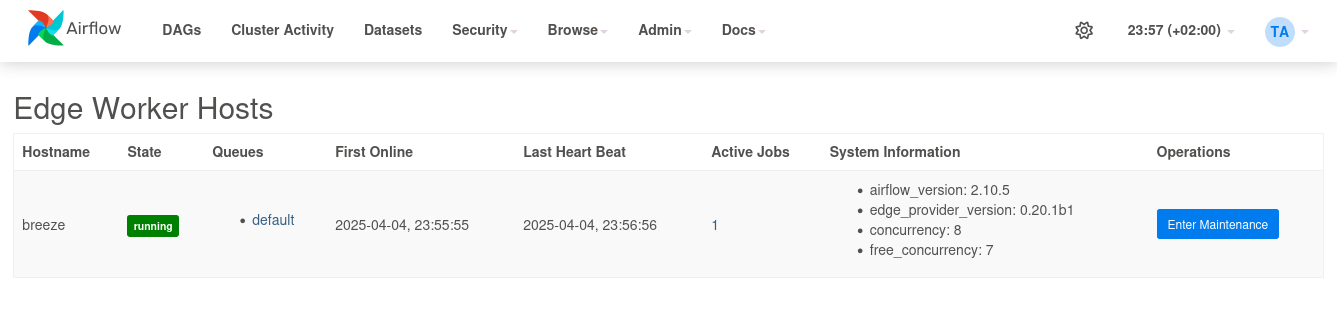
Via the UI you can also set the status of the worker to “Maintenance” or “Active”.
The status and maintenance comments will also be shown in the web UI in the “Admin” - “Edge Worker” page.
To be able to use the UI plugin you need to be in role “Admin” or “Op” or have the individual permissions “can read on Plugins” and “can read on Jobs” assigned. With these permissions you can view the UI and also configure the remote workers (Technical key: AccessView.JOBS). With this permission you can also manage the workers like adjusting queues, concurrency, set them to maintenance mode or shutdown the workers.
Warning
“can read on Jobs” (AccessView.JOBS) is the management permission for Edge workers, not a
read-only one. It is deliberately the single permission gating the whole plugin, and the worker
management endpoints under /edge_worker/ui/ check only this permission – the HTTP method is not
part of the check. “can read on Plugins” governs only whether the plugin appears in the UI
navigation; it is not required in order to call the endpoints.
A principal holding “can read on Jobs” can therefore shut down, delete, re-queue and retune Edge workers by calling those endpoints directly, whether or not the plugin is visible to them.
This matters for the default Viewer role, which includes “can read on Jobs”. In a default
Flask AppBuilder setup a Viewer does not see the Edge plugin in the navigation (Viewer has no
“can read on Plugins”), but can still reach the worker management endpoints. If Viewers in your
deployment must not manage Edge workers, remove “can read on Jobs” from that role or give those
users a custom role without it.
Finer-grained separation of read and management permissions for Edge workers is not implemented; it is listed under Edge Provider Architecture as a known missing feature.
Note that maintenance mode can also be adjusted via CLI. See Worker Maintenance Mode for more details.