Multi-Team
Warning
Multi-Team is an experimental feature still in preview. Airflow 3.3 delivers a substantial part of the feature, but it is not yet complete: some functionality is still planned for a future release (3.4+), and behavior may change without warning based on user feedback. See the Work in Progress section below for details.
Multi-Team Airflow is a feature that enables organizations to run multiple teams within a single Airflow deployment while providing resource isolation and team-based access controls. This feature is designed for medium to large organizations that need to share Airflow infrastructure across multiple teams while maintaining logical separation of resources.
Note
Multi-Team Airflow is different from multi-tenancy. It provides isolation within a single deployment but is not designed for complete tenant separation. All teams share the same Airflow infrastructure, scheduler, and metadata database.
When to Use Multi-Team Mode
Multi-Team mode is designed for medium to large organizations that typically have many discrete teams who need access to an Airflow environment. Often there is a dedicated platform or DevOps team to manage the shared Airflow infrastructure, but this is not required.
Use Multi-Team mode when:
You have many teams that need to share Airflow infrastructure
You need resource isolation (Variables, Connections, Secrets, etc) between teams at the UI and API level (see Airflow Security Model for task-level isolation limitations)
You want separate execution environments per team
You want separate views per team in the Airflow UI
You want to minimize operational overhead or cost by sharing a single Airflow deployment
Core Concepts
Teams
A Team is a logical grouping that represents a group of users within your organization. Teams are in part stored in the Airflow metadata database and serve as the basis for resource isolation.
Teams within the Airflow database have a very simple structure, only containing one field:
name: A unique identifier for the team (3-50 characters, lower case letters, digits, hyphens and underscores, with no two consecutive underscores)
Teams are associated with Dag bundles through a separate association table, which links team names to Dag bundle names.
Dag Bundles and Team Ownership
Teams are associated with Dags through Dag Bundles. A Dag bundle can be owned by at most one team. When a Dag bundle is assigned to a team:
All Dags within that bundle belong to that team
Tasks in those Dags inherit the team association
All Callbacks associated with those Dags also inherit the team association
Triggers created by those Dags’ tasks inherit the team association
The scheduler uses this relationship to determine which executor to use
Note
The relationship chain is: Task/Callback → Dag → Dag Bundle → Team
Resource Isolation
When Multi-Team mode is enabled, the following resources can be scoped to specific teams:
Variables: Team members can only access variables owned by their team or global variables
Connections: Team members can only access connections owned by their team or global connections
Pools: Pools can be assigned to teams
XComs: Tasks can only access XComs of Dags in their own team (plus, for reads, global Dags)
Plugins: A plugin can declare the team that owns it, scoping what it contributes to that team
Dags themselves are team-scoped through bundle ownership (see Dag Bundles and Team Ownership above); their visibility in the UI and REST API follows the same team boundary, subject to the auth manager.
Resources without a team assignment are considered global and accessible to all teams.
Team-scoped XComs
When Multi-Team mode is enabled, XCom access through the Task Execution API is scoped to the requesting
task’s team, derived from the task’s Dag via the Dag -> bundle -> team relationship. There is no
cross-team XCom sharing:
A task may read XComs belonging to Dags in its own team, as well as XComs of global (teamless) Dags.
A task may write or delete XComs only for Dags in its own team. A team task cannot mutate a global Dag’s XCom, mirroring how team-scoped Variables and Connections behave.
This boundary is enforced at the Execution API only. As with other resources, it does not constrain components that have direct database access (see Airflow Security Model).
Secrets Backends
Airflow’s secrets backends, including: environment variables, metastore and local filesystem are team-aware. Custom Secrets Backends are supported on a case by case basis.
When a task requests a Variable or Connection, the secrets backend will return a team-specific value, if any. The backend will automatically resolve the correct value based on the requesting task’s team.
Plugins
A plugin declares the team that owns it by setting team_name in its own code. Airflow then offers its
API endpoints, UI views, macros, operator extra links and scheduling classes (timetables, partition mappers,
deadline references, etc) to that team only. A plugin that leaves team_name unset is global, as every
plugin written before this feature is.
Listeners are deployment-wide: every listener receives events for all teams, and choosing which listeners run is the Deployment Manager’s responsibility.
See Multi-team deployments for what each plugin attribute does, and for the cases where the scoping is logical rather than enforceable.
Auth Manager
In order to use multi-team mode, the auth manager must be compatible with it. A compatible auth manager must implement two methods:
is_authorized_team: Determines whether a user is authorized to perform a given action on a team. It is used primarily to check whether a user belongs to a team._get_teams: Returns the set of teams defined in the auth manager.
During initialization, Airflow compares the teams defined in the auth manager with the teams in the Airflow
metadata database. A mismatch in either direction – a team the auth manager defines that the database does
not have, or a team the database has that the auth manager does not define – emits a UserWarning.
Startup is not blocked, so watch the startup log for these warnings.
If the auth manager you are using does not implement these methods, Airflow will raise a
NotImplementedError at runtime.
Example of auth managers compatible with multi-team:
Simple auth manager (recommended for development usage only)
Enabling Multi-Team Mode
To enable Multi-Team mode, set the following configuration in your airflow.cfg:
[core]
multi_team = True
Or via environment variable:
export AIRFLOW__CORE__MULTI_TEAM=True
Warning
Changing this setting on an existing deployment requires careful planning.
Tuning Team Resolution Caching
Added in version 3.3.0.
Every Dag authorization check resolves the Dag’s owning team from its bundle. Because some endpoints
(such as the grid view) re-poll continuously, Airflow caches this Dag -> team mapping in memory to
avoid repeated joins against the Team table. Control the cache lifetime with:
[core]
team_name_cache_ttl = 30
The value is the number of seconds a resolved team is cached before it is looked up again (default
30). A team reassignment takes up to this many seconds to take effect, and different API server
workers may briefly disagree during that window. Set it to 0 to disable caching.
Creating and Managing Teams
Teams are managed using the Airflow CLI. The following commands are available:
Creating a Team
airflow teams create <team_name>
The team name must satisfy the constraints described in Teams above.
Listing Teams
airflow teams list
This displays all teams in the deployment with their names.
Deleting a Team
airflow teams delete <team_name>
Or to skip the confirmation prompt:
airflow teams delete <team_name> --yes
Warning
A team cannot be deleted if it has associated resources (Dag bundles, Variables, Connections, or Pools). You must remove these associations first.
Syncing Teams from the Dag Bundle Config
Added in version 3.3.0.
airflow teams sync
Creates a team for every team_name in the Dag bundle config that the
database does not have yet, so the bundle config can be the one place teams are declared instead of running
airflow teams create once per team. It also creates the default pool of any configured team that is
missing one, including teams that already existed.
Verifying the Configuration
Added in version 3.4.0.
airflow teams verify
Checks the multi-team configuration against the database and reports any of these problems:
a team that has no default pool
a team referenced by a Dag bundle but missing from the database
Configuring Team Resources
Team-scoped Variables
Variables can be associated with teams when created. Tasks belonging to a team can access:
Variables owned by their team
Global variables (no team association)
When a task requests a variable, the system checks for a team-specific variable first.
Team-scoped variables can be created and managed through the Airflow UI or via environment variables.
Via environment variables, you can set team-scoped variables using the format:
# Global variable
export AIRFLOW_VAR_MY_VARIABLE="global_value"

# Team-scoped variable for "team_a"
export AIRFLOW_VAR__TEAM_A___MY_VARIABLE="team_a_value"
The format is: AIRFLOW_VAR__{TEAM}___{KEY} (note: double underscore before team, triple underscore between team and key)
Team-scoped Connections
Connections follow the same pattern as variables. Tasks can access connections owned by their team or global connections.
Team-scoped connections can be created and managed through the Airflow UI or via environment variables.
Via environment variables:
# Global connection
export AIRFLOW_CONN_MY_DATABASE="postgresql://..."

# Team-scoped connection for "team_a"
export AIRFLOW_CONN__TEAM_A___MY_DATABASE="postgresql://..."
The format is: AIRFLOW_CONN__{TEAM}___{CONN_ID} (note: double underscore before team, triple underscore between team and connection ID)
Team-scoped Pools
Pools can be assigned to teams, providing resource isolation for task execution slots. When a pool is assigned to a team:
Only tasks from that team can use the pool
The scheduler validates pool access when scheduling tasks
Tasks attempting to use a pool from another team will fail with an error
Pools without a team assignment remain globally accessible to all teams.
Creating Team-scoped Pools via CLI
Use the --team-name option with airflow pools set to assign a pool to a team:
# Create a pool assigned to team_a
airflow pools set team_a_pool 10 "Pool for team A" --team-name team_a

# Create a global pool (no team assignment)
airflow pools set shared_pool 20 "Shared pool for all teams"

# Update an existing pool to assign it to a team
airflow pools set existing_pool 5 "Now team-scoped" --team-name team_b
Note
The --team-name option is rejected when core.multi_team is disabled.
The specified team must exist in the database (create it first with airflow teams create).
When core.multi_team is enabled, airflow teams create automatically
creates a default pool named default_pool_<team_name>. By default, tasks
in Dag bundles associated with that team are automatically assigned to
the team’s default pool unless another pool is explicitly configured.
Creating Team-scoped Pools via the REST API
Use the POST /api/v2/pools endpoint with the team_name field in the request body:
curl -X POST "http://localhost:8080/api/v2/pools" \
  -H "Content-Type: application/json" \
  -d '{
    "name": "team_a_pool",
    "slots": 10,
    "description": "Pool for team A",
    "include_deferred": false,
    "team_name": "team_a"
  }'
To update an existing pool’s team assignment, use PATCH /api/v2/pools/{pool_name}:
curl -X PATCH "http://localhost:8080/api/v2/pools/team_a_pool" \
  -H "Content-Type: application/json" \
  -d '{"team_name": "team_a"}'
Omit team_name or set it to null to make a pool global.
Creating Team-scoped Pools via the UI
In the Airflow UI, navigate to Admin > Pools and create or edit a pool. When Multi-Team mode is enabled, a Team dropdown is available to assign the pool to a team. Leave it empty for a global pool.
Team-based Executor Configuration
One of the most powerful features of Multi-Team mode is the ability to configure different executors per team or the same executor but configured differently. This allows teams to have dedicated compute resources or execution flows per team.
Similarly to global executors, team-scoped executor configurations also support multiple executors (for example, both
LocalExecutor and KubernetesExecutor), allowing tasks within that team to specify which executor to use. For
details on configuring multiple executors, see Using Multiple Executors Concurrently.
Configuration Format
The executor configuration supports team-based assignments using the following format:
[core]
executor = GlobalExecutor;team1=Team1Executor;team2=Team2Executor
For example:
[core]
executor = LocalExecutor;team_a=CeleryExecutor;team_b=KubernetesExecutor
In this configuration:
LocalExecutoris the global default executorTasks from
team_auseCeleryExecutoror theLocalExecutorTasks from
team_buseKubernetesExecutoror theLocalExecutorTasks from the global scope use the
LocalExecutor
Important Rules
Global executor must come first: At least one global executor (without a team prefix) must be configured and must appear before any team-specific executors.
Teams must exist: All team names in the executor configuration must exist in the database before Airflow starts.
Executor must support multi-team: Not all executors support multi-team mode. The executor class must have
supports_multi_team = True.No duplicate teams: Each team may only appear once in the executor configuration.
No duplicate executors within a team: A team cannot have the same executor configured multiple times.
Example configurations:
# Valid: Global executor with team-specific executors
executor = LocalExecutor;team_a=CeleryExecutor

# Valid: Multiple team-specific executors
executor = LocalExecutor;team_a=CeleryExecutor;team_b=KubernetesExecutor

# Valid: Multiple executors globally and per team
executor = LocalExecutor,KubernetesExecutor;team_a=CeleryExecutor,KubernetesExecutor;team_b=LocalExecutor

# Invalid: No global executor
executor = team_a=CeleryExecutor;team_b=LocalExecutor

# Invalid: Global executor after team executor
executor = team_a=CeleryExecutor;LocalExecutor

# Invalid: Duplicate Team
executor = LocalExecutor;team_a=CeleryExecutor;team_b=LocalExecutor;team_a=KubernetesExecutor

# Invalid: Duplicate Executor within a Team
executor = LocalExecutor;team_a=CeleryExecutor,CeleryExecutor;team_b=LocalExecutor
Aliasing Executors Across Teams
When the same executor type is used at both the global and team level (e.g., LocalExecutor globally and
LocalExecutor for a team), if tasks wish to target the global executor they need a way to distinguish between the
two instances. To accomplish this, you can assign aliases to core executors using the Alias:ExecutorName syntax:
[core]
executor = global_celery_exec:CeleryExecutor;team1=team_celery_exec:CeleryExecutor
With this configuration:
The global
CeleryExecutoris available via the aliasglobal_celery_execThe team_a
CeleryExecutoris available via the aliasteam_celery_execA task in
team_athat setsexecutor="team_celery_exec",executor="CeleryExecutor", orexecutor="airflow.providers.celery.executors.celery_executor.CeleryExecutor"will run on the team executorA task in
team_athat setsexecutor="global_celery_exec"will run on the global executor
# Runs on the global CeleryExecutor via alias
BashOperator(
    task_id="uses_global",
    executor="global_celery_exec",
    bash_command="echo 'running on global executor'",
)

# Runs on team_a's CeleryExecutor via alias
BashOperator(
    task_id="use_team_alias",
    executor="team_celery_exec",
    bash_command="echo 'running on team executor'",
)

# Runs on team_a's CeleryExecutor via class name
BashOperator(
    task_id="use_team_classname",
    executor="CeleryExecutor",
    bash_command="echo 'running on team executor'",
)

# Runs on team_a's CeleryExecutor via full module path
BashOperator(
    task_id="use_team_module_path",
    executor="airflow.providers.celery.executors.celery_executor.CeleryExecutor",
    bash_command="echo 'running on team executor'",
)

# Also runs on team_a's CeleryExecutor (implicit team default)
BashOperator(
    task_id="use_default",
    bash_command="echo 'running on default team executor'",
)
Aliases work with all core executors (LocalExecutor, CeleryExecutor, KubernetesExecutor, etc) as
well as custom executor module paths. For more information on aliases and multiple executor configuration,
see Using Multiple Executors Concurrently.
Team-specific Executor Settings
When multiple teams use the same executor type (e.g., both team_a and team_b using CeleryExecutor),
each team can provide its own configuration for that executor. This allows teams to point to different Celery
brokers, use different Kubernetes namespaces, or customize any executor setting independently.
Configuration Resolution Order
When a team executor reads a configuration value (e.g., [celery] broker_url), the system checks the
following sources in order, returning the first value found:
Team-specific environment variable —
AIRFLOW__{TEAM}___{SECTION}__{KEY}Team-specific config file section —
[team_name=section]Default values — built-in defaults or
fallbackvalues
The following sources are skipped for team executors (they do not yet support team-based configuration):
Command execution (
{key}_cmd)Secrets backend (
{key}_secret)
Note
Team-specific configuration does not fall back to the global environment variable or global config file
settings. For example, if there is a global CeleryExecutor and a team CeleryExecutor in use, the global
CeleryExecutor may want to increase celery.worker_concurrency from the default of 16 to 32 by
overriding this configuration. However, the team CeleryExecutor should not be forced to 32, it will
continue to use the default of 16 unless it is explicitly overridden with team-specific configuration.
Via Environment Variables
Team-specific configuration can be provided using environment variables with the following format:
AIRFLOW__{TEAM}___{SECTION}__{KEY}
Note the delimiters: double underscore before the team name (part of the AIRFLOW__ prefix), triple
underscore between the team name and section, and double underscore between section and key. The team name
is uppercase.
# team_a's Celery broker URL
export AIRFLOW__TEAM_A___CELERY__BROKER_URL="redis://team-a-redis:6379/0"

# team_b's Celery broker URL
export AIRFLOW__TEAM_B___CELERY__BROKER_URL="redis://team-b-redis:6379/0"

# team_b's Celery result backend
export AIRFLOW__TEAM_B___CELERY__RESULT_BACKEND="db+postgresql+psycopg://team-b-db/celery_results"
Via Config File
Team-specific settings can also be placed in the airflow.cfg file using sections prefixed with the team
name followed by an equals sign:
# Global celery settings (used by the global executor, NOT as a fallback for teams)
[celery]
broker_url = redis://default-redis:6379/0
result_backend = db+postgresql+psycopg://default-db/celery_results

# team_a overrides
[team_a=celery]
broker_url = redis://team-a-redis:6379/0
result_backend = db+postgresql+psycopg://team-a-db/celery_results

# team_b overrides
[team_b=celery]
broker_url = redis://team-b-redis:6379/0
result_backend = db+postgresql+psycopg://team-b-db/celery_results
Dag Bundle to Team Association
Dag bundles are associated with teams through the Dag bundle configuration. When configuring your Dag bundles, you specify a team_name for each bundle:
[dag_processor]
dag_bundle_config_list = [
    {
        "name": "team_a_dags",
        "classpath": "airflow.dag_processing.bundles.local.LocalDagBundle",
        "kwargs": {"path": "/opt/airflow/dags/team_a"},
        "team_name": "team_a"
    },
    {
        "name": "team_b_dags",
        "classpath": "airflow.dag_processing.bundles.local.LocalDagBundle",
        "kwargs": {"path": "/opt/airflow/dags/team_b"},
        "team_name": "team_b"
    },
    {
        "name": "shared_dags",
        "classpath": "airflow.dag_processing.bundles.local.LocalDagBundle",
        "kwargs": {"path": "/opt/airflow/dags/shared"}
    }
]
In this example:
Dags in
/opt/airflow/dags/team_abelong toteam_aDags in
/opt/airflow/dags/team_bbelong toteam_bDags in
/opt/airflow/dags/sharedhave no team (global)
Note
The team specified in team_name must exist in the database before syncing the Dag bundles. Create the
teams first with airflow teams create, or let airflow teams sync create them from this config
(see Syncing Teams from the Dag Bundle Config).
How Scheduling Works
When Multi-Team mode is enabled, the scheduler performs additional logic to determine the correct executor for each task:
Task to Team Resolution: The scheduler resolves the team for each task by following the relationship chain:
Task → Dag (via
dag_id)Dag → Dag Bundle (via
bundle_name)Dag Bundle → Team (via
dag_bundle_teamassociation table)
Executor Selection: Once the team is determined:
If a team-specific executor is configured, use that executor
Otherwise, fall back to the global default executor
Warning
Multi-Team Airflow provides logical isolation for a secure perimeter around teams, not complete isolation. All teams share the same metadata database and common Airflow infrastructure. For absolutely strict security requirements, consider separate Airflow deployments.
Team-scoped Triggerer
Added in version 3.3.0.
When Multi-Team mode is enabled, a triggerer should be scoped to each specific team using the --team-name CLI argument. A team-scoped triggerer processes deferred tasks (triggers) belonging to that team’s Dags. This allows teams to run isolated triggerer instances with independent capacity and failure domains.
Configuration
Start a team-scoped triggerer by passing --team-name:
# Triggerer for team_a only
airflow triggerer --team-name team_a

# Triggerer for team_b only
airflow triggerer --team-name team_b

# Global triggerer — processes triggers from Dags with no team association
airflow triggerer
Startup validation ensures that core.multi_team is enabled and the specified team exists in the database.
Behavior
Team-scoped triggerer (
--team-name team_x): Only picks up triggers whose originating Dag belongs to a bundle mapped toteam_x.Global triggerer (no
--team-name): Only picks up triggers whose originating Dag belongs to a bundle with no team assignment.Multi-Team disabled (
core.multi_team = False):--team-nameis rejected. No filtering occurs and all triggerers process all triggers (existing behavior).
Interaction with --queues
Team filtering and queue filtering are orthogonal — they combine as AND conditions. For example, a triggerer started with --team-name team_a --queues q1,q2 only processes triggers that both belong to team_a and were deferred from tasks in queues q1 or q2.
Note
Ensure that at least one triggerer is running for every team, otherwise that team’s triggers will
remain unassigned until one starts — the same applies to every queue when --queues is used. If you
combine --team-name and --queues, this requirement extends to each team-and-queue combination.
Team-scoped Dag Processing
The Dag processor parses Dag files from your configured Dag bundles. Unlike the triggerer, it is not
scoped with --team-name directly; it is scoped by bundle using the --bundle-name CLI argument
(which may be passed more than once). Because each bundle is owned by at most one team, scoping a
processor to a team’s bundle(s) scopes it to that team. The teams a processor serves are derived from the
Dag bundle config.
# Process only team_a's bundle(s)
airflow dag-processor --bundle-name team_a_dags

# Process several bundles (for example, all of team_b's bundles)
airflow dag-processor --bundle-name team_b_dags --bundle-name team_b_extra_dags

# Process every configured bundle (all teams and global bundles)
airflow dag-processor
Running one Dag processor per team (scoped to that team’s bundles) is recommended, so that each
team’s Dag code is parsed in a separate process and teams stay isolated. Unlike the triggerer, however,
this is not required for coverage: a global triggerer only picks up teamless triggers, whereas a Dag
processor started without --bundle-name parses every configured bundle. A single global Dag
processor therefore covers every team’s Dags as well as global (teamless) bundles, which is possible but
gives up the per-team parsing isolation.
Note
When you do split parsing across multiple --bundle-name processors, make sure every configured
bundle is covered by at least one running processor; a bundle that no processor parses will not have
its Dags parsed or updated.
Note
Scoping a processor to a team’s bundles keeps teams in separate parsing processes, but all those processes still share the same host. For the tightest boundary, run each team’s Dag processor on separate team-owned compute (for example, separate VMs, containers, or servers) so that one team’s Dag parsing cannot consume resources or otherwise interfere with another team’s. This is not required, but it provides stronger isolation than per-process separation alone.
Team-Based Asset Event Filtering
When Multi-Team mode is enabled, asset events are filtered by team membership before they trigger downstream Dag runs. This prevents asset events produced by one team’s Dags from unintentionally triggering Dag runs for a different team.
Default Behavior
By default, a consuming Dag only receives asset events from producers within the same team or from Dags with no team association, i.e. global Dags.
Cross-Team Opt-In with producer_teams
Added in version 3.3.0.
To allow specific teams to produce events that trigger consumers on a given asset from another team, use the
access_control parameter on the Asset definition with an AssetAccessControl instance:
from airflow.sdk import Asset, AssetAccessControl

shared_data = Asset(
    name="shared_data",
    uri="s3://bucket/shared/data.csv",
    access_control=AssetAccessControl(
        producer_teams=["team_analytics", "team_ml"],
    ),
)
With this configuration, asset events from team_analytics or team_ml will be accepted by any
consuming Dag that schedules on shared_data, in addition to events from the consumer’s own team.
To block global (teamless) Dag producers from triggering consumers, set allow_global=False:
strict_data = Asset(
    name="strict_data",
    uri="s3://bucket/strict/data.csv",
    access_control=AssetAccessControl(
        producer_teams=["team_analytics"],
        allow_global=False,
    ),
)
Cross-Team Opt-In with consumer_teams
Added in version 3.3.0.
While producer_teams is specified on the consumer side (on the asset used in a Dag’s schedule),
consumer_teams is specified on the producer side (on the asset used in a task’s outlets). It
controls which consumer teams are permitted to receive events produced by that specific task.
from airflow.sdk import DAG, Asset, AssetAccessControl, task

restricted_output = Asset(
    name="restricted_output",
    uri="s3://bucket/restricted/output.csv",
    access_control=AssetAccessControl(
        consumer_teams=["team_downstream", "team_reporting"],
    ),
)

with DAG(dag_id="producer_dag", schedule="@daily"):

    @task(outlets=[restricted_output])
    def produce_data():
        """Only team_downstream and team_reporting can consume events from this task."""
With this configuration, only consuming Dags belonging to team_downstream or team_reporting (plus
teamless consumers) will receive asset events produced by the produce_data task.
Note
The default value of consumer_teams is None, which is not equivalent to an empty list:
None(the default, or when the field is omitted): no consumer-team restriction is applied. Cross-team delivery is then governed solely by each consumer’s ownproducer_teamsopt-in.[](an explicit empty list): restricts delivery to the producer’s own team (plus teamless consumers, subject toallow_global). This blocks all cross-team consumers, even one that lists this producer in itsproducer_teams.["team_x", ...]: additionally delivers to the listed cross-team consumers.
Per-producer scoping
consumer_teams is scoped per producing task, not per asset. If multiple tasks produce events
for the same asset, each task’s consumer_teams applies independently to the events it produces:
from airflow.sdk import DAG, Asset, AssetAccessControl, task

# This task restricts consumers to team_a only
restricted_asset = Asset(
    name="shared_asset",
    uri="s3://bucket/shared.csv",
    access_control=AssetAccessControl(
        consumer_teams=["team_a"],
    ),
)

# This task sets no access_control, so consumer_teams defaults to None (no consumer-team restriction)
unrestricted_asset = Asset(name="shared_asset", uri="s3://bucket/shared.csv")

with DAG(dag_id="dag_1", schedule="@daily"):

    @task(outlets=[restricted_asset])
    def task_restricted():
        """Events from this task only reach team_a consumers."""


with DAG(dag_id="dag_2", schedule="@daily"):

    @task(outlets=[unrestricted_asset])
    def task_unrestricted():
        """Events from this task reach all consumers (no restriction)."""
Interaction with producer_teams
Both producer_teams and consumer_teams are applied as a logical AND. A consumer Dag
is queued only if it passes both checks:
producer_teams(consumer side): “Which producer teams am I willing to accept events from?”consumer_teams(producer side): “Which consumer teams am I willing to deliver events to?”
For example, if a consumer’s schedule reference has producer_teams=["team_x"] and the producer’s
outlet reference has consumer_teams=["team_y"], the consumer will only be queued if the producer
belongs to team_x and the consumer belongs to team_y.
Teamless consumer pass-through
Teamless consumers (Dags with no team association) pass through the consumer_teams list check,
regardless of its contents. However, they can still be blocked by setting allow_global=False on
the producer-side asset, which prevents teamless consumers from receiving events. By default
(allow_global=True), teamless consumers receive events from all producers.
Behavioral Rules
The following table describes the complete filtering logic:
Producer |
Consumer |
|
|
|
Result |
Reason |
|---|---|---|---|---|---|---|
Team A (Dag) |
Team A |
(any) |
(any) |
(any) |
✅ Allowed |
Same team |
Team A (Dag) |
Team B |
|
(any) |
(any) |
❌ Blocked |
Different team, no producer opt-in |
Team A (Dag) |
Team B |
|
|
(any) |
✅ Allowed |
Producer opt-in, |
Team A (Dag) |
Team B |
|
|
(any) |
❌ Blocked |
|
Team A (Dag) |
Team B |
|
|
(any) |
✅ Allowed |
Both opt-ins satisfied |
Team A (Dag) |
Team B |
|
|
(any) |
❌ Blocked |
Consumer team not in consumer_teams |
Team A (Dag) |
Team B |
|
|
(any) |
❌ Blocked |
Producer opt-in not satisfied (AND logic) |
(no team, Dag) |
Team B |
(any) |
|
|
✅ Allowed |
Global producer, allow_global is True |
(no team, Dag) |
Team B |
(any) |
(any) |
|
❌ Blocked |
Global producer blocked by allow_global=False |
(no team, Dag) |
Team B |
(any) |
|
|
✅ Allowed |
Global producer, allow_global is True, consumer in list |
(no team, Dag) |
Team B |
(any) |
|
(any) |
❌ Blocked |
Global producer, but consumer not in consumer_teams |
Team A (Dag) |
(no team) |
(any) |
(any) |
(any) |
✅ Allowed |
Teamless consumer passes through (unless producer-side |
(no team, Dag) |
(no team) |
(any) |
(any) |
(any) |
✅ Allowed |
Both global |
Team A (API) |
Team A |
(any) |
(any) |
(any) |
✅ Allowed |
Same team |
Team A (API) |
Team B |
|
|
(any) |
✅ Allowed |
Producer opt-in, |
Team A (API) |
Team B |
|
|
(any) |
✅ Allowed |
Both opt-ins satisfied |
Team A (API) |
(no team) |
(any) |
(any) |
(any) |
✅ Allowed |
Teamless consumer always passes through |
(no team, API) |
Team B |
(any) |
(any) |
(any) |
❌ Blocked |
Teamless API user cannot trigger team-bound consumer |
(no team, API) |
(no team) |
(any) |
(any) |
(any) |
✅ Allowed |
Both global |
Key rules:
Same team: Always allowed.
Global (teamless) Dag producer with
allow_global=True: Triggers all consumers regardless of team (unlessconsumer_teamsrestricts them).Global (teamless) Dag producer with
allow_global=False: Blocked from triggering team-bound consumers.Teamless API user: Can only trigger teamless consumers. Unlike a teamless Dag, which is deployed by a platform operator and intentionally shared, an API user without a team has no verified team affiliation, so their events are restricted to teamless consumers to prevent unscoped access to team-bound pipelines.
Teamless consumer: Accepts events from any source (Dag or API), regardless of team or
consumer_teams, unlessallow_global=Falseis set on the producer-side asset.Cross-team via
producer_teams: Allowed when the producer’s team is listed in the asset’sproducer_teams.Cross-team via
consumer_teams: Allowed when the consumer’s team is listed in the producing task’sconsumer_teams.Both filters (AND logic): When both
producer_teamsandconsumer_teamsare specified, a consumer must pass both checks to be queued.Multi-Team disabled: All filtering is skipped; existing behavior is preserved.
API-Triggered Events
When a user creates an asset event via the REST API, the user’s team is resolved from the auth manager. The same filtering rules apply, with one distinction: a teamless API user can only trigger teamless consumers, whereas a teamless Dag producer is treated as global and can trigger any consumer.
The REST API also accepts an optional access_control object in the request body with the following
fields:
consumer_teams(list[str] | null): restricts which consumer teams can receive the event, following the same rules as the task-levelconsumer_teams. When omitted ornull, no consumer-team filtering is applied.allow_global(bool, defaulttrue): whether teamless consumers can receive the event.
When Multi-Team mode is disabled, the access_control parameter is accepted but ignored.
Real-World Example: Cross-Team Data Pipeline
Consider an e-commerce platform with three teams:
team_ingestion: Ingests raw clickstream data from Kafka into S3 every hour.
team_analytics: Builds aggregated reporting tables from that raw data.
team_ml: Trains recommendation models using the same raw data.
All three teams reference the same asset (s3://data-lake/clickstream/hourly.parquet), but in
different roles:
# --- team_ingestion's Dag bundle ---
from airflow.sdk import DAG, Asset, AssetAccessControl, task

clickstream = Asset(
    name="clickstream_hourly",
    uri="s3://data-lake/clickstream/hourly.parquet",
    access_control=AssetAccessControl(
        # Allow team_analytics and team_ml to consume events produced by team_ingestion
        consumer_teams=["team_analytics", "team_ml"],
    ),
)

with DAG(dag_id="ingest_clickstream", schedule="@hourly"):

    @task(outlets=[clickstream])
    def ingest_from_kafka():
        """Pull clickstream events from Kafka and write to S3."""
# --- team_analytics's Dag bundle ---
from airflow.sdk import DAG, Asset, AssetAccessControl

clickstream = Asset(
    name="clickstream_hourly",
    uri="s3://data-lake/clickstream/hourly.parquet",
    access_control=AssetAccessControl(
        # Accept events from team_ingestion (in addition to own-team events)
        producer_teams=["team_ingestion"],
    ),
)

with DAG(dag_id="build_reporting_tables", schedule=clickstream):
    ...
# --- team_ml's Dag bundle ---
from airflow.sdk import DAG, Asset, AssetAccessControl

clickstream = Asset(
    name="clickstream_hourly",
    uri="s3://data-lake/clickstream/hourly.parquet",
    access_control=AssetAccessControl(
        # Accept events from team_ingestion (in addition to own-team events)
        producer_teams=["team_ingestion"],
    ),
)

with DAG(dag_id="train_recommendations", schedule=clickstream):
    ...
In this setup:
The
clickstream_hourlyasset is the same global object across all three teams.When
team_ingestion’singest_from_kafkatask completes, it emits an asset event.team_analytics’sbuild_reporting_tablesandteam_ml’strain_recommendationsboth receive the event because:The consumer side (
producer_teams=["team_ingestion"]) opts in to accept events fromteam_ingestion.The producer side (
consumer_teams=["team_analytics", "team_ml"]) opts in to deliver events to those consumer teams.
A Dag from an unrelated
team_marketingwould not receive the event, because it is neither listed inconsumer_teamson the producer side nor does it listteam_ingestionin its ownproducer_teams.
Team-based Metrics
Added in version 3.3.0.
When Multi-Team mode is enabled, Airflow adds a team_name tag to many of its operational metrics,
identifying the team that owns the resource each metric relates to. This lets you break activity down per
team in your metrics backend. The tag is only present for team-owned resources; global pools, teamless
Dags, and global components emit the same metrics without a team_name tag.
Note
The team_name dimension is emitted as a metric tag, so it requires a tag-aware metrics
backend: either StatsD with tagging enabled (for example, the Datadog or InfluxDB dialects) or
OpenTelemetry.
Note
When Multi-Team mode is disabled, metrics are emitted with no team_name tag whatsoever, exactly
as they have always been emitted for a single-team Airflow environment.
The team_name tag is applied to metrics across the following components. The metrics named are
examples only, not a complete list:
Triggerer: heartbeat, capacity, blocked-main-thread, trigger-queue delay, and trigger-outcome metrics (
triggerer_heartbeat,triggers.running, etc.).Executors: executor slot gauges and scheduler-observed executor heartbeat timing (
executor.open_slots,executor.queued_tasks, etc.).Scheduler: pool slot gauges for team-scoped pools plus task- and asset-scheduling counters (
pool.open_slots,scheduler.tasks.killed_externally, etc.).Dag runs: dag run timing and lifecycle metrics (
dagrun.duration.<state>,dagrun.first_task_scheduling_delay, etc.).Task instances: task start, finish, and outcome counters (
ti.start,ti.finish, etc.).Dag processing: per-file parsing and callback metrics (
dag_processing.processes,dag_processing.processor_timeouts, etc.).Callbacks: callback execution counters (
callback_<state>, optionally prefixed).Connection tests: per-request worker and reaper metrics for team-owned connection tests (
connection_test.success,connection_test.failed, etc.). Instance-wide connection-test queue gauges remain untagged.
Note
Provider-specific metrics are also tagged where the provider carries a team identity (for example,
team-scoped executor and worker metrics). Provider executors additionally inherit core
executor.* slot gauges from the base executor. Check individual provider change logs for the
minimum Airflow version that includes team_name tagging.
Note
This list is not exhaustive and may lag behind the code. Use it to see which areas of Airflow
carry the team_name tag; the metric emission sites in the Airflow source are the
authoritative reference for individual metric names.
Important Considerations
Work in Progress
Multi-Team mode is currently an experimental feature in preview. It is not yet fully complete and may be subject to changes without warning based on user feedback. Some missing functionality that will arrive in a future release (3.4+) includes:
Some UI elements may not be fully team-aware
Command and Secrets based lookup for team based configuration
Global Uniqueness of Identifiers
Dag IDs, Variable keys, and Connection IDs must be unique across the entire Airflow deployment, regardless of which team owns them. This is similar to how S3 bucket names are globally unique across all AWS accounts. You should establish naming conventions within your organization to avoid naming conflicts (e.g. prefix identifiers with the team name)
Architecture
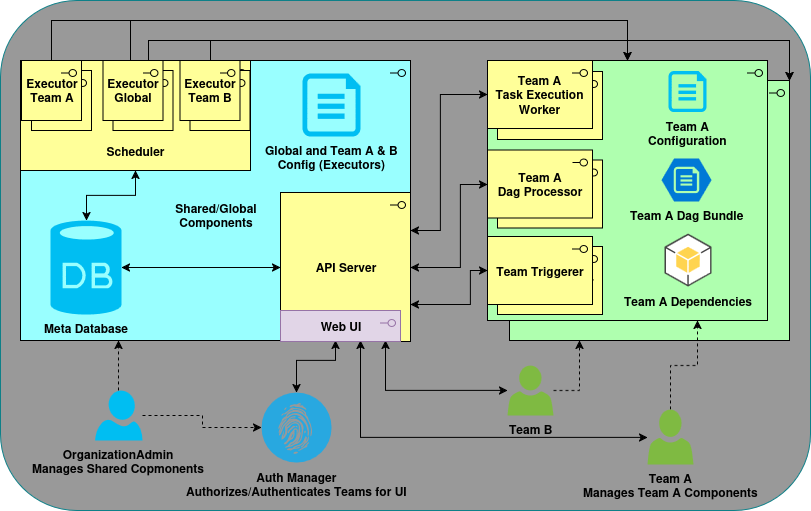
The following diagram shows a Multi-Team Airflow deployment with resource isolation between teams.
The components in blue are the shared components and those in green are the team components (note the green shadow box indicating more than one team is present in the architecture).